
App Settings: Theme, Arachnophobia Mode, and More
A few settings shape how Scutely looks and runs day to day. They all live in Settings.
Theme
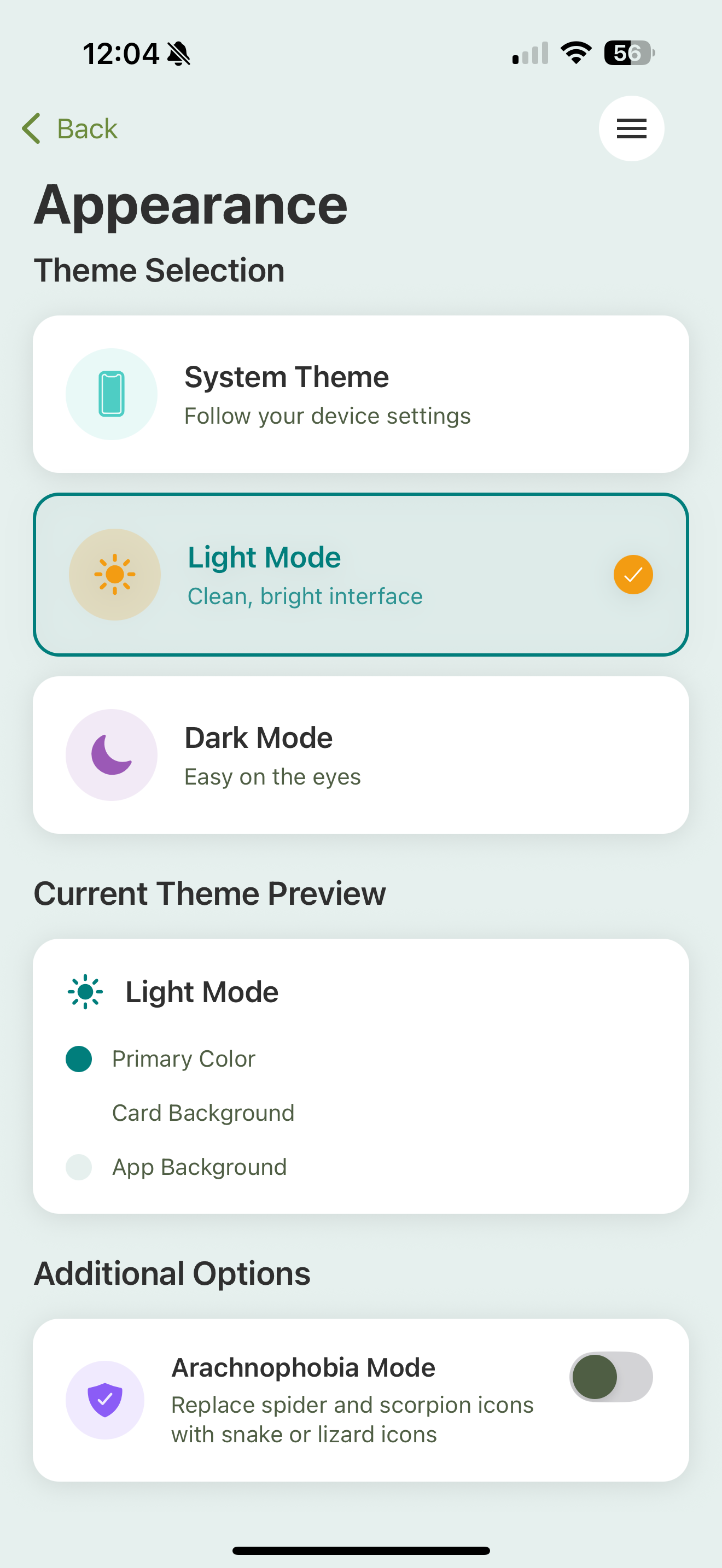
Scutely has light and dark modes, plus a system option that follows your device. Set it in Settings → App Appearance, or use the quick toggle at the top of Settings to cycle through them.
Arachnophobia mode
Arachnophobia mode replaces spider and scorpion icons throughout the app, including on the family grid, with snake and lizard ones. You’ll find it under App Appearance → Additional Options. Everything works the same; only the icons change.
Custom content
Custom Content Settings is where your own additions live, in three tabs:
- Traits — custom traits for anything not in the database yet. See Traits & morphs.
- Feeders — custom feeder types beyond the built-in prey options.
- Events — your own event types. See Custom event types.
How many of each you can create depends on your plan. See Plans & tiers.
Cache
Scutely keeps species and trait data on your device so browsing stays fast, refreshing it automatically about once a week. If something looks stale (say a newly approved HerpDex trait isn’t showing), go to Settings → Clear Cache and use Refresh Cache. Reset Cache clears everything and re-downloads fresh; it needs an internet connection.
About & updates
Settings → About shows your app version and the changelog, a list of what changed in each release. You’ll also find quick buttons to contact support or rate the app.